










ScaleTrader is a sophisticated trading algorithm within Interactive Brokers’ platform that elevates pair trading strategies to new levels of efficiency and precision. The essence behind the algorithm when applied to pairs trading is that it allows investors to automatically execute both sides of correlated security relationships as price disparities develop. ScaleTrader systematically implements pair trades across multiple price levels, helping traders capitalize on statistical relationships while managing risk. Whether you’re looking to minimize market impact, improve average execution prices, or implement automated mean-reversion strategies, ScaleTrader provides pair trading functionality that goes well beyond conventional order types.
There are several scenarios where ScaleTrader offers strategic advantages for pair traders:
Exploiting Statistical Arbitrage Opportunities
In pairs trading, timing the entry of both legs becomes particularly challenging. Rather than trying to perfectly time a single entry point, ScaleTrader allows traders to spread their entries across a range of price relationship values, potentially capturing better average prices as the spread between the securities fluctuates. This reduces the risk of poorly timed entries and the psychological stress that accompanies them.
Mean Reversion and Spread Exploitation
For security pairs that tend to oscillate within defined statistical relationships, ScaleTrader with profit orders and size restoration creates an automated mean-reversion system. The tool will continuously execute the long side of the pair at wider spreads and the short side at narrower spreads, capturing the oscillations between these levels repeatedly. This approach is particularly effective in pairs that maintain consistent correlations but experience temporary dislocations.
Risk Management for Complex Pair Strategies
Institutional traders and portfolio managers often face the challenge of executing large pair trades without adversely impacting the market. ScaleTrader provides a systematic approach to breaking these orders into smaller, more manageable components that can be executed over time with reduced market impact. This is especially valuable in less liquid security pairs where large single orders might cause significant slippage or disruption to the spread relationship.
Accessing ScaleTrader
ScaleTrader can be accessed in the Trader Workstation (TWS) in the New Window area under More Advanced Tools located in the other tools section. For pair trades, the investor uses the Pair Tab.
ScaleTrader is comprised of seven sections: Action Area, Scale Orders, Scale Chart, Auto Price Adjustment, Profit Orders, Summary, and Status. In this article we are going to walk through the investor setting up a pairs trade using the profit order feature.
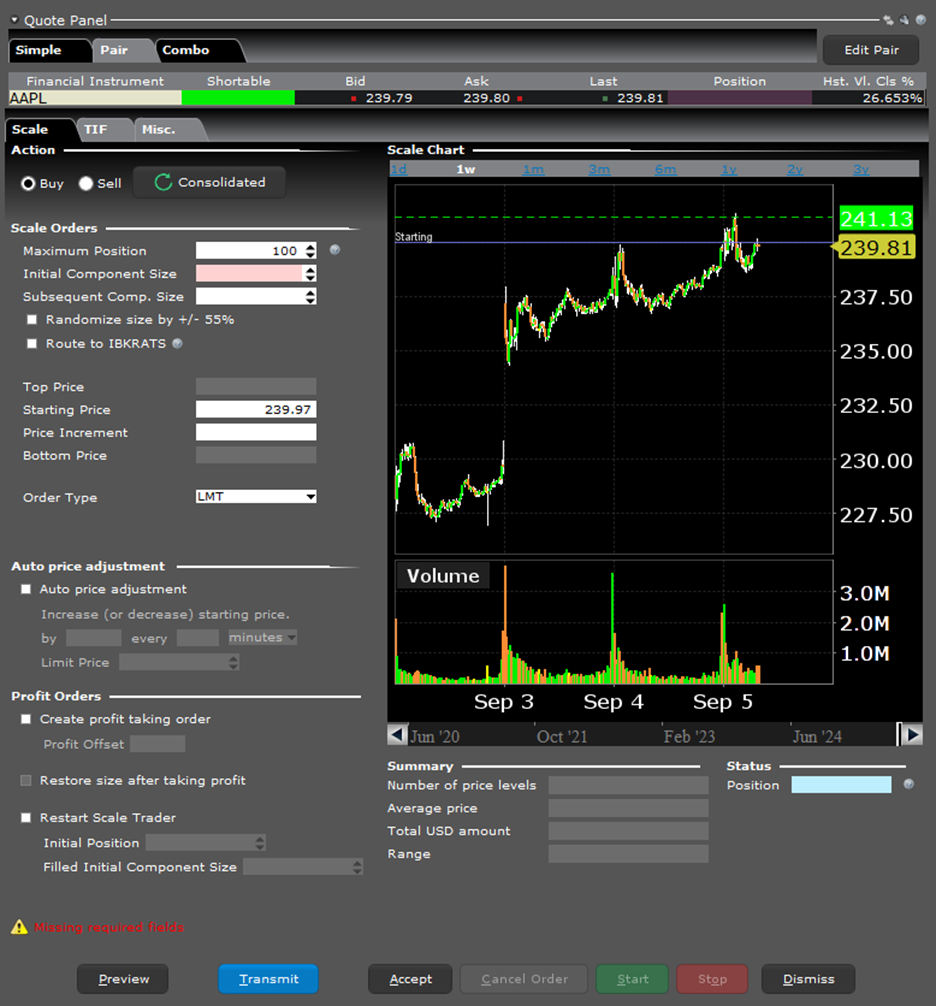
Past performance is not indicative of future results. Source: IB Trader Workstation
To illustrate ScaleTrader’s capabilities, let’s examine a real-world pairs trading scenario. An investor may decide that the fortunes of two competing companies, as portrayed by their respective market capitalizations, are about to change. The basic idea is that the share price of Company A will outpace that of Company B over time.
In our example, an investor believes IBM (Symbol: IBM) will outperform Oracle (Symbol: ORCL). The relative price difference between these two technology giants needs to be accounted for in our ScaleTrader setup.
Configuring ScaleTrader for Pairs Trading
Once the ScaleTrader window appears, follow these steps:
- Click on the Pairs tab and “Edit Pair” on the upper right-hand side
- Fill in the Buy side underlying with IBM and select stock
- Enter ORCL and select stock in the sell side underlying
- Select the pricing method:
- Net Amount: Defines the total monetary value of the trade (sum of all transaction amounts)
- Price Difference: Defines the spread between the two securities prices (absolute difference)
In our scenario, the investor selects “Price Difference” and clicks “Create Pair.” It’s important to note that the combo can only be executed as non-guaranteed.
Setting Up the Pair Ratio and Position Size
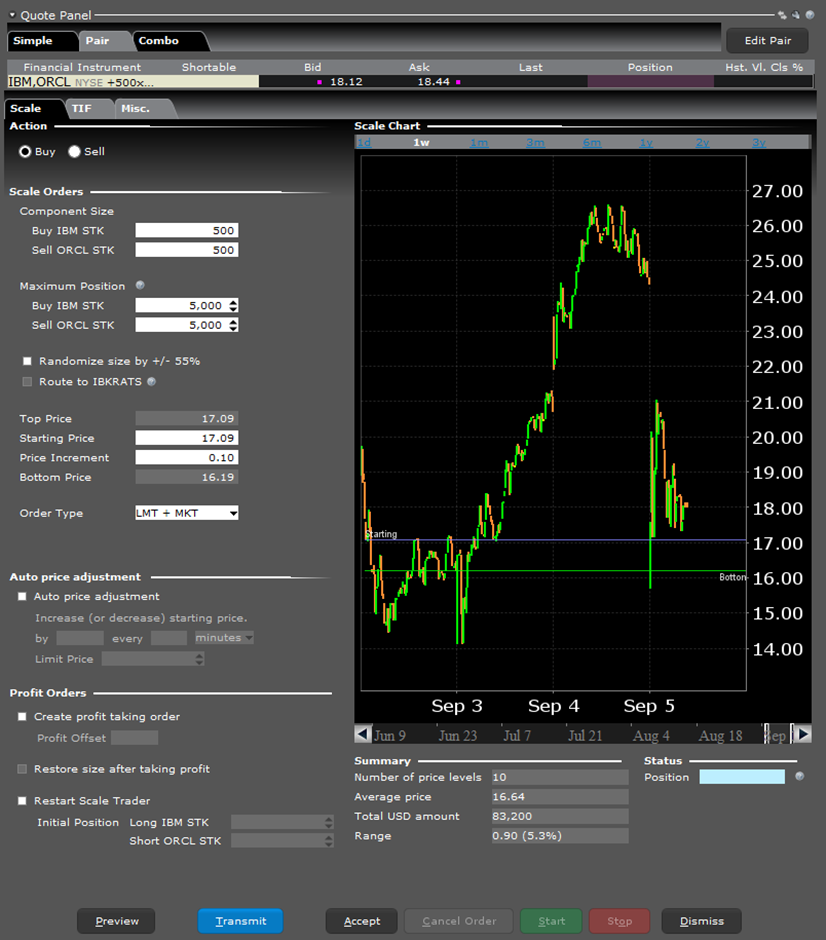
Since IBM and ORCL trade at similar price points, the investor will keep the component size the same, they should use an appropriate lot size, such as 100, 200, etc.
Next, input the maximum position you’re willing to trade. In our example, the investor enters 5,000 for IBM, and the ORCL position automatically updates to maintain the constant ratio.
Defining Price Levels and Increments
The investor can select the starting price either by typing it in or selecting a spot on the chart, which will be marked with a blue line. Since this is a buy order, the top price automatically updates to match the starting price (the highest price ScaleTrader will submit for purchase). They can then set the bottom price by either moving the green line (the increment will be automatically calculated) or by entering a price increment. Using an appropriate increment based on historical spread behavior, the bottom price is calculated automatically.
The Summary section at the bottom center of the screen provides a comprehensive overview of the pair trading parameters, including:
- Number of price levels
- Average price
- Total dollar exposure across both legs
- Range of spread values covered by the scale orders
Past performance is not indicative of future results. Source: IB Trader Workstation
Order Type and Time in Force
The investor chooses “Limit and Market” as the order type, which submits one or both sides as a limit order, and once the first leg is filled, the second is submitted as a market order. For time in force, the investor sets it to GTC (Good Till Canceled) by clicking on the TIF tab and selecting from the drop-down menu.
Implementing Profit Orders with Pair Trading
An investor can create a comprehensive pair trading system by utilizing ScaleTrader’s profit taking order feature:
- Click the box next to “Create profit taking orders”
- Enter the desired value for the profit offset
With this feature enabled, ScaleTrader will create a sell order at the specified profit level above each filled buy order. The profit offset should be higher than the scale price increment, in this example the investor will use $0.50. This pattern continues for each buy order submitted.
The investor can also choose to “restore the size after taking profit.” If selected, this will cancel the current scaled incremental order and send a buy order with the same price as the component that was closed out for a profit, creating a perpetual pair trading cycle.
The Restart ScaleTrader Function
The “Restart ScaleTrader” function is especially valuable for pair traders, as it resets and reinitializes both sides of the pair trade when market conditions change. This feature is only available if the investor is using the profit-taking and restore size instructions.
The Restart instruction helps the investor resume a cancelled or busted ScaleTrader order, starting from the point at which the scaled sequence left off. A busted scale order results in a lost connection between the scale and profit order processes, leaving only two independent scaled orders.
Activating and Monitoring Your Pair Trade
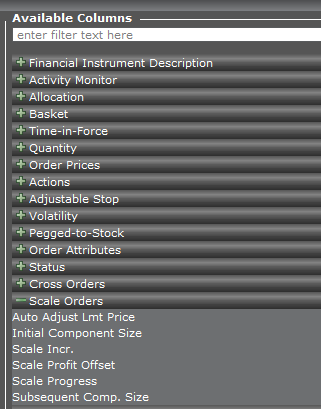
Once the investor has reviewed their pair trading parameters, they click on Transmit, and an Order Confirmation window appears. After final review, clicking Transmit activates ScaleTrader. The order will be displayed in the Activity panel, where ScaleTrader-specific data columns may be added by clicking on the gear icon and selecting from:
- Initial Component Size
- Scale Increase
- Scale Profit Offset
- Scale Progress
- Subsequent Completion Size
Source: IB Trader Workstation
ScaleTrader transforms pairs trading from a manually intensive process into a systematic, automated strategy that can be implemented across multiple asset classes including Stocks, ETFs, Options, Futures, FOPs, Currencies, Bonds, and Warrants. By leveraging ScaleTrader’s advanced features, traders can exploit statistical relationships between securities with greater precision, improved risk management, and reduced emotional interference. Whether you’re a statistical arbitrageur looking to capitalize on mean reversion or a portfolio manager implementing relative value strategies, ScaleTrader provides the tools to execute pair trades with unprecedented efficiency and sophistication.
For more on ScaleTrader please see the Trader’s Academy Lessons
- ScaleTrader
- ScaleTrader – Pairs Trading
- ScaleTrader – Setting Profit Orders
- ScaleTrader – Pairs Trading using the Profit Taker
New to Interactive Brokers?
Open AccountAlready an Interactive Brokers Client?
Request Trading PermissionDisclosure: Interactive Brokers
The analysis in this material is provided for information only and is not and should not be construed as an offer to sell or the solicitation of an offer to buy any security. To the extent that this material discusses general market activity, industry or sector trends or other broad-based economic or political conditions, it should not be construed as research or investment advice. To the extent that it includes references to specific securities, commodities, currencies, or other instruments, those references do not constitute a recommendation by IBKR to buy, sell or hold such investments. This material does not and is not intended to take into account the particular financial conditions, investment objectives or requirements of individual customers. Before acting on this material, you should consider whether it is suitable for your particular circumstances and, as necessary, seek professional advice.
The views and opinions expressed herein are those of the author and do not necessarily reflect the views of Interactive Brokers, its affiliates, or its employees.






Join The Conversation
If you have a general question, it may already be covered in our FAQs page. go to: IBKR Ireland FAQs or IBKR U.K. FAQs. If you have an account-specific question or concern, please reach out to Client Services: IBKR Ireland or IBKR U.K..
Visit IBKR U.K. Open an IBKR U.K. Account