
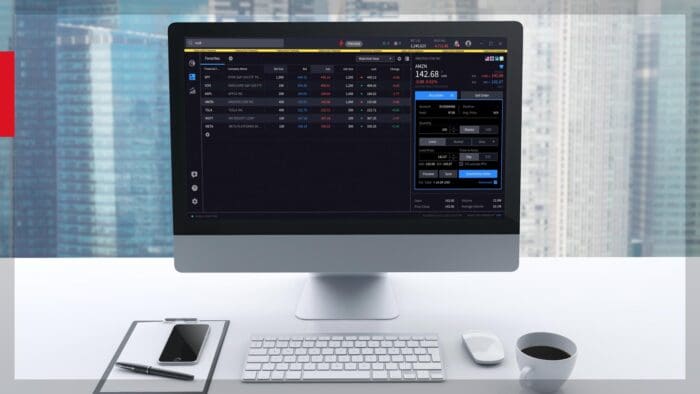









For many individual investors and finance enthusiasts, the challenge isn’t just finding promising stocks—it’s navigating a maze of complex filters, technical terms, and rigid screening tools. The modern investment landscape demands tools that are not only powerful, but also easy to use. Enter Interactive Brokers’ advanced AI-powered stock screener, a solution designed to revolutionize how investors discover opportunities, making the process smarter, more intuitive, and accessible than ever before.
Traditional stock screeners often require users to select dozens of parameters—like P/E ratios, market caps, or technical signals—leaving many feeling overwhelmed or excluded. Interactive Brokers’ AI-powered screener changes the game by allowing investors to search using plain language. Instead of wrestling with dropdown menus or cryptic terms, the investor can simply describe what they’re looking for, such as “pharmaceutical stocks with a net profit margin greater than 10% and an EPS growth greater than 15%,” and let the AI do the heavy lifting. This shift from complex filters to natural language transforms the investment process for both novices and experts, unlocking a world of opportunities with just a few words.
Getting started with the AI-powered screener in IBKR Desktop is straightforward and user-friendly. First click on the “Screener” icon on the left-hand side.
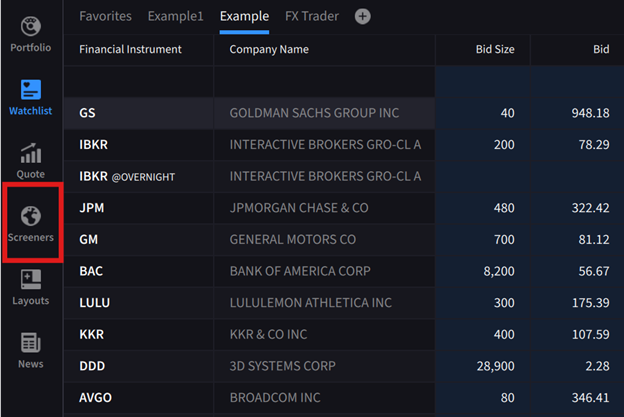
Source: IBKR Desktop
The platform offers two convenient access points:
- Click on the prominent purple box labeled “Configure Screener with AI” on the left side of the screen
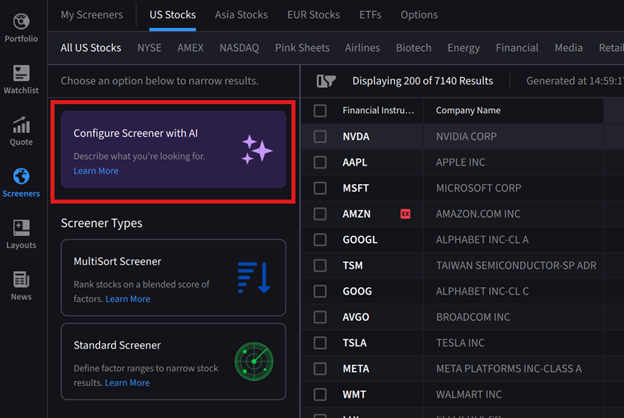
Source: IBKR Desktop
- Access it through “My Screeners” in the upper left corner, then click the plus sign and select “Configure New Screener with AI.”
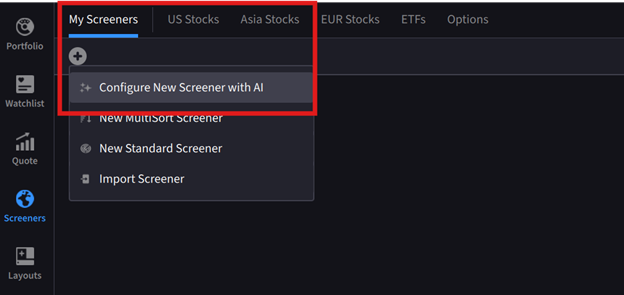
Source: IBKR Desktop
Once accessed, a dialogue box appears on the right-hand side where the investor can type their search criteria in natural, conversational language.
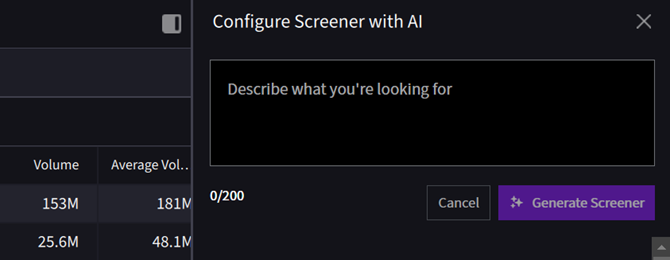
Source: IBKR Desktop
Behind the scenes, the system’s large language model (LLM) analyzes the request and intelligently determines whether to deploy a multisort or standard screener configuration, automatically optimizing the approach based on the query’s complexity.
In this example the investor is looking for potentially high growth midcap stocks with strong momentum, high revenue and earnings growth. In the dialogue box they type, “sort midcap stocks with high 50 day moving averages, high year-over-year revenue growth, and high year-over year earnings growth.
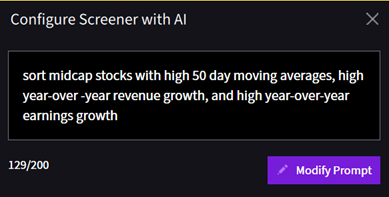
Source: IBKR Desktop
The AI-powered screener provides transparent feedback through three easy-to-read prompts that update in real-time: Understanding Request, Applying Region/Product/Exchange, and Applying Filter Criteria.
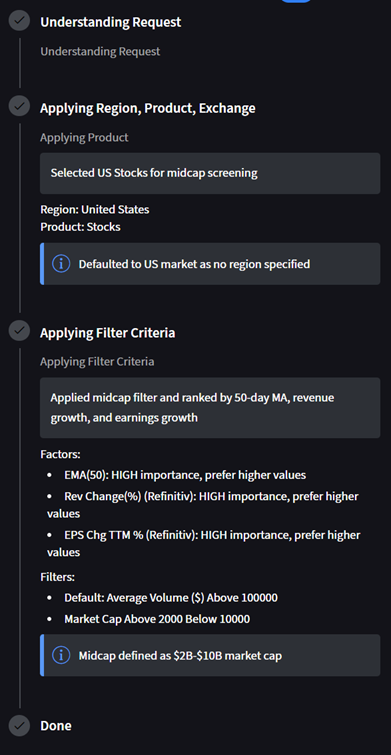
Source: IBKR Desktop
These progress indicators build confidence by showing exactly what the system is doing. Once complete, a curated list of stocks matching the criteria is displayed.
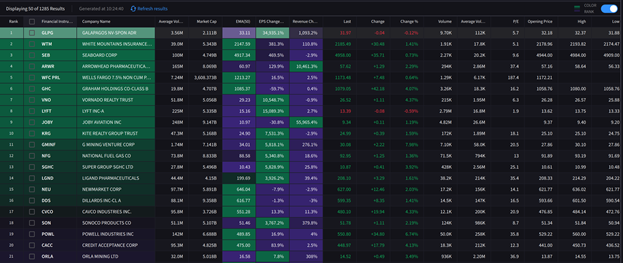
Source: IBKR Desktop, past performance is not indicative of future returns.
One of the standout features of Interactive Brokers’ AI-powered Screener is its adaptability. Investors can easily modify their queries, add or remove criteria, or ask follow-up questions, the flexibility is remarkable. The results from the above search produced a list of over 1,200 stocks, if the investor wants to narrow the results by adding in additional criteria they click “Modify Prompt” to adjust parameters—in the above scenario adding in, “include only revenue growth 20%-50% and earnings growth 15%-40%” and clicks Regenerate Screener.
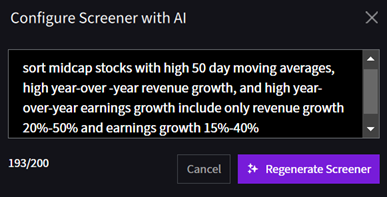
Source: IBKR Desktop
The new results show a more manageable 17 results for the investor to further research.
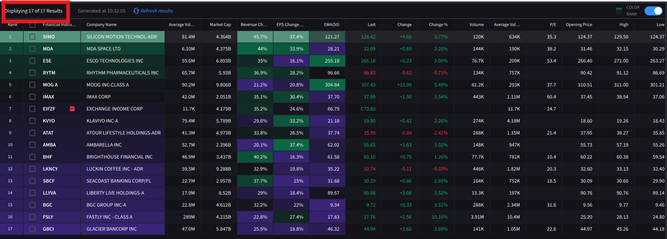
Source: IBKR Desktop, past performance is not indicative of future returns.
The AI-powered screener offers several compelling advantages:
- Intuitive Searching: By eliminating technical jargon and complex filters, it lowers the barrier for all investors, making stock discovery easier and more inclusive.
- Real-Time Feedback: The screener processes natural language prompts instantly, providing up-to-date results and allowing users to react quickly to market changes.
- Flexible Modification: Investors can continually refine their screens, experiment with new ideas, and adapt to evolving strategies—all within a seamless workflow.
- Empowerment: By harnessing AI, users gain confidence and control, exploring opportunities they might have missed using traditional tools.
Together, these features usher in a new era of smart, intuitive investing, where technology works for the investor—not the other way around.
For more on the IBKR Desktop AI Screener please see the Traders Academy lesson: AI Configured Screener
New to Interactive Brokers?
Open AccountAlready an Interactive Brokers Client?
Request Trading PermissionDisclosure: Interactive Brokers
The analysis in this material is provided for information only and is not and should not be construed as an offer to sell or the solicitation of an offer to buy any security. To the extent that this material discusses general market activity, industry or sector trends or other broad-based economic or political conditions, it should not be construed as research or investment advice. To the extent that it includes references to specific securities, commodities, currencies, or other instruments, those references do not constitute a recommendation by IBKR to buy, sell or hold such investments. This material does not and is not intended to take into account the particular financial conditions, investment objectives or requirements of individual customers. Before acting on this material, you should consider whether it is suitable for your particular circumstances and, as necessary, seek professional advice.
The views and opinions expressed herein are those of the author and do not necessarily reflect the views of Interactive Brokers, its affiliates, or its employees.
Disclosure: Interview Relationship with IBKR
The interviewee’s employer or associated organization has a business relationship as a client and futures commission merchant, or FCM, with Interactive Brokers.





Join The Conversation
If you have a general question, it may already be covered in our FAQs page. go to: IBKR Ireland FAQs or IBKR U.K. FAQs. If you have an account-specific question or concern, please reach out to Client Services: IBKR Ireland or IBKR U.K..
Visit IBKR U.K. Open an IBKR U.K. Account